
Image & Media
Exact Image KB Optimizer
Compress an image to under 20 KB, 50 KB, 100 KB or any size you choose, keeping the best quality possible. Runs in your browser.
Image & Media
Upload a vertical 9:16 video or image and see what the Instagram Reels and YouTube Shorts interface covers, using zones measured on real phones. The checker flags text, faces and logos the app would hide and suggests how far to move them. TikTok is included as a clearly labelled provisional estimate. Everything runs in your browser: your file is never uploaded.
Upload. Choose or drop a 9:16 video (MP4, MOV, WebM) or image (PNG, JPG, WebP). The file stays on your device.
Inspect. The checker samples frames and outlines text and logo-like areas it finds.
Mark what matters. Check the boxes: give each one a type (text, face, logo, product), move or resize it, delete false ones and draw any it missed.
Choose platforms. Pick Instagram Reels, YouTube Shorts and, optionally, TikTok (provisional), plus your caption length.
Read the issues. Each platform gets a verdict and a score, with every problem listed by severity and why it matters.
Apply the fixes. When an element is covered, the issue suggests the smallest move or shrink that clears it. Adjust the box and the result updates straight away.
Export. Download an annotated frame, transparent overlays for your editor, a JSON report, or print a summary.
Checking a Reel or Short before posting, so the headline isn't hidden under the caption.
Placing logos and calls to action clear of the like, comment and share buttons.
Giving designers and editors a transparent overlay of the measured zones to work against.
Reviewing client or agency creatives against the same zones for both platforms at once.
Last verified: October 2026
Safe-zone measurements are based on observed platform interfaces on the test devices listed below, using the app versions current when they were measured. They are intended as practical guidance rather than official platform specifications. Platform interfaces can change between devices, app versions, account configurations and platform experiments.
The Instagram Reels and YouTube Shorts zones were measured in October 2026 from screenshots of calibration videos played in the official apps, on a 1080 × 1920 frame:
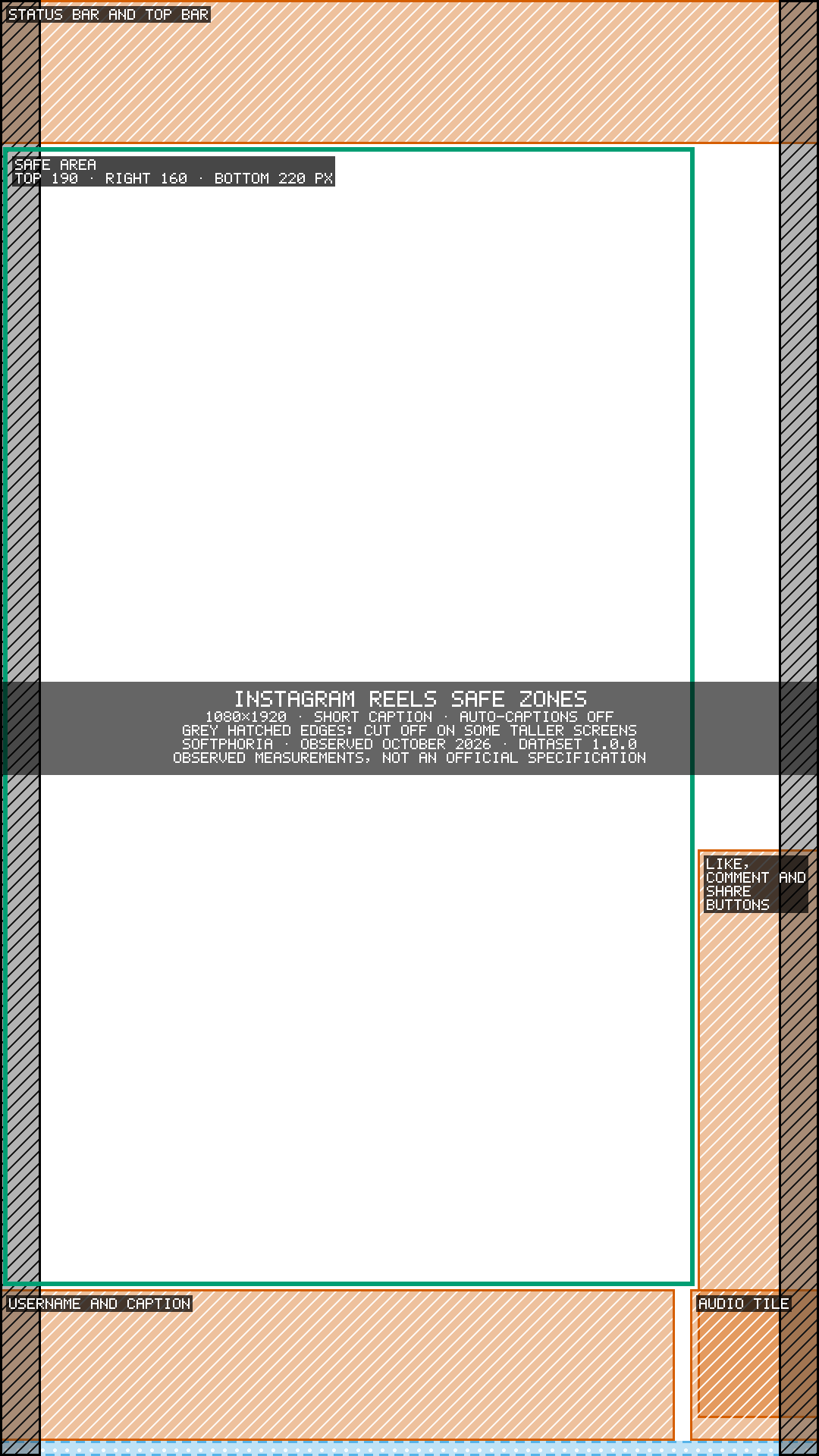
Instagram Reels, measured on an iPhone 14 Plus and a Nokia 6.1 Plus: keep the top 190 px, the right 160 px and the bottom 220 px clear (short caption).
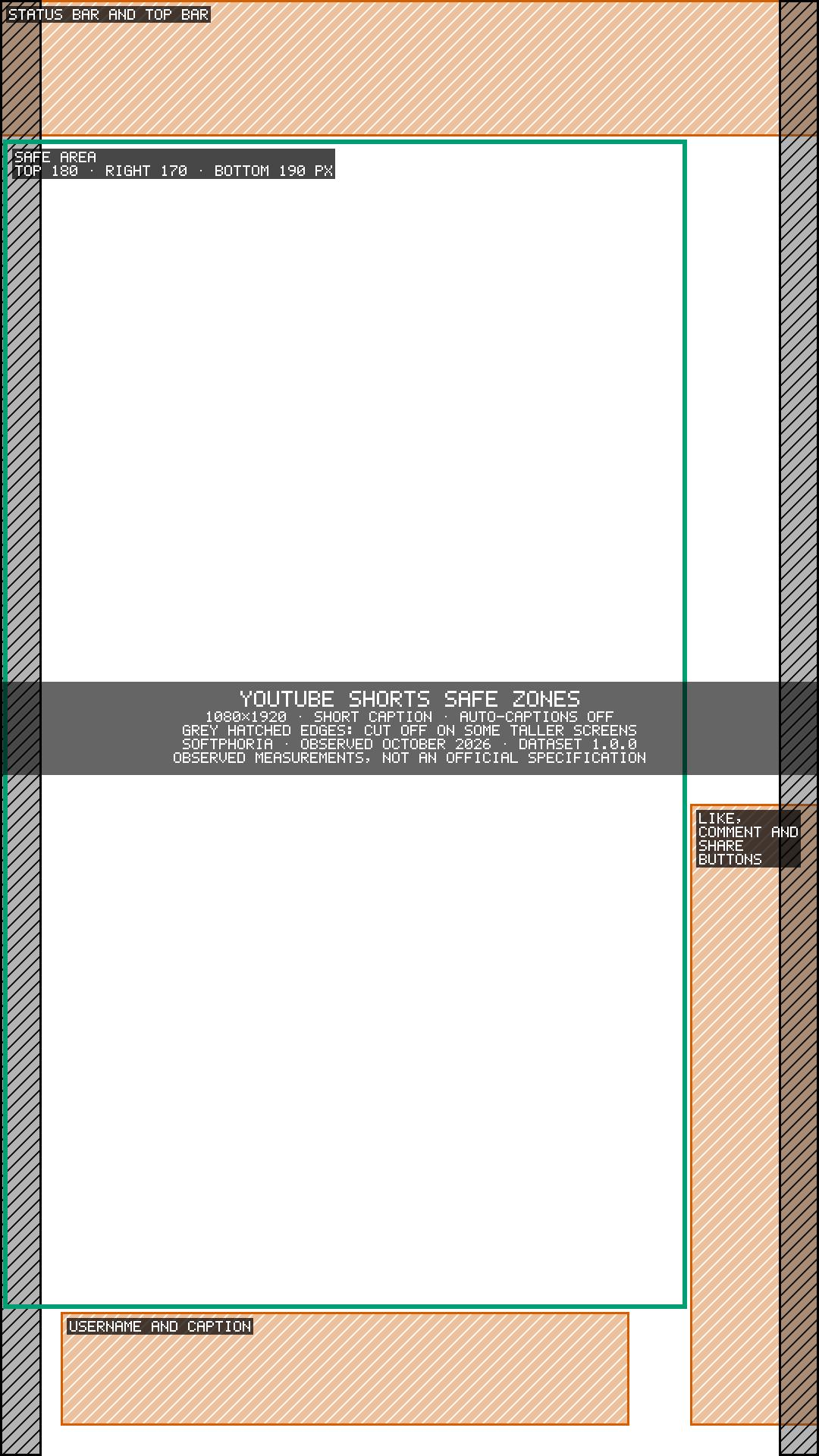
YouTube Shorts, measured on an iPhone 14 Plus and a Samsung Galaxy A20s: keep the top 180 px, the right 170 px and the bottom 190 px clear.
TikTok could not be measured. Its zones are a provisional estimate, clearly labelled, and a TikTok check never shows a Pass.
At a glance, the space to keep clear on a 1080 × 1920 frame:
Platform | Top | Right | Bottom | Basis |
|---|---|---|---|---|
Instagram Reels | 190 px | 160 px | 220 px | Observed on tested devices |
YouTube Shorts | 180 px | 170 px | 190 px | Observed on tested devices |
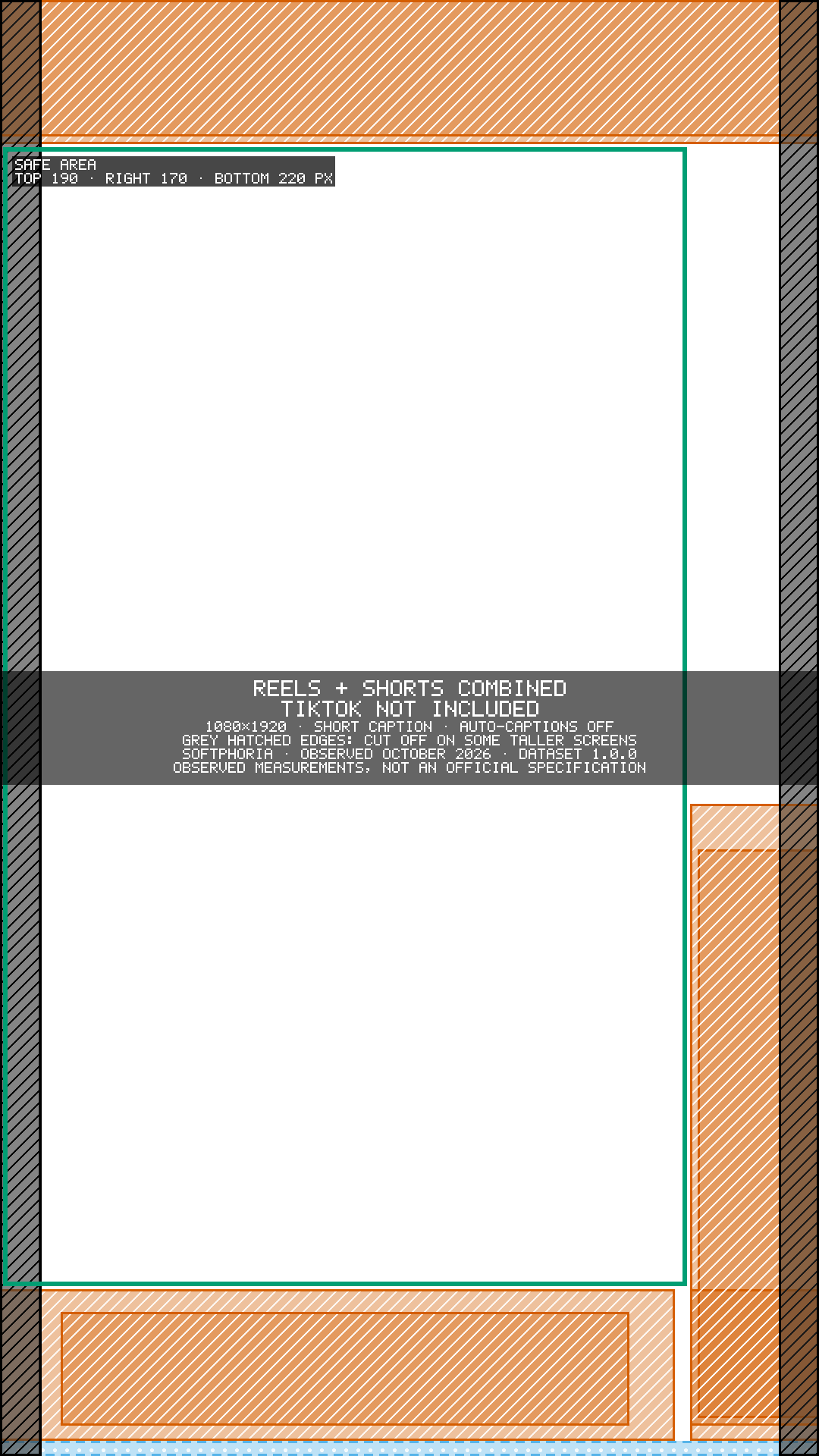
Combined Reels + Shorts | 190 px | 170 px | 220 px | Union of measured Reels + Shorts zones |
TikTok | Provisional | — | — | Not measured; estimate only |
The measurements combine observations from iOS and Android test devices. Different devices or future app updates may display interface elements differently.
Longer captions, auto-captions and taller phone screens cover more of the frame; choose those settings in the checker to include them.
TikTok was not directly measured in the test environment, so its checker preset is provisional. It uses the union of the measured Instagram Reels and YouTube Shorts zones as a conservative working estimate. It is not treated as an official TikTok specification, and a TikTok check never shows a Pass.
Instagram Reels safe zone: measured margins, plus the caption-open and auto-caption areas
YouTube Shorts safe zone: measured margins and the auto-caption band near the top
1080×1920 safe zone guide for Reels & Shorts: one set of margins for both apps
Why safe-zone numbers differ: organic posts vs ad guidance, devices and interface states
Transparent 1080 × 1920 overlays of the measured zones, to place over your video in an editor:
Measured and maintained by Softphoria. About Softphoria
FAQ
No. The checker runs entirely in your browser tab. Your video or image is read on your device and never sent to a server.
Instagram Reels and YouTube Shorts, using zones measured in the official apps. TikTok is included as a provisional estimate because it could not be measured; a TikTok check never shows a Pass.
Vertical 9:16 videos (MP4, MOV, WebM) and images (PNG, JPG, WebP). Other shapes such as 4:5 or 1:1 are shown but not scored, because each app displays them differently. Up to the first 3 minutes of a video are analysed.
Something sits partly inside an area the app covers or may cover. Look at the listed issue and decide whether that element matters; the suggested fix shows how far to move it.
The zones were measured on specific phones and app versions, and apps change over time. Automatic detection can miss elements, so check the boxes and adjust them. Use the result as a careful guide, not a guarantee.
Compress an image to under 20 KB, 50 KB, 100 KB or any size you choose, keeping the best quality possible. Runs in your browser.
Check image dimensions, aspect ratio, file format, file size, crop compatibility and platform requirements before you publish.
Check SRT and WebVTT subtitle files for timestamp, timing, overlap and reading-speed problems, then download a corrected copy.
Our team builds, improves and supports websites and software for businesses in India and worldwide. Tell us what you need.
Contact Us
Send us a message and we'll get back to you.
Message sent